Bring Rafay Into Your AI Workflows with the Rafay MCP Server
AI assistants are now part of everyday work for platform, DevOps, and SRE teams. We use them to debug code, make sense of configuration, and understand how systems behave. But when it comes to managing Kubernetes clusters and platform infrastructure, these assistants hit a wall: they have no secure, real-time view of your environment.
Without a secure window into your actual operational state AI tools are forced to guess rely on stale data or require engineers to manually copy paste massive YAML files and CLI outputs into chat windows.
To bridge this gap without compromising on security, we are thrilled to introduce the Rafay MCP Server.
Why MCP? The Standardization Shift
Until recently, connecting internal platform data to AI models meant building and maintaining bespoke plugins, brittle API integrations, or custom wrappers for every single AI tool your developers wanted to use.
By adopting the open-source Model Context Protocol (MCP) championed by industry leaders like Anthropic, Rafay is investing in a standardized ecosystem. Think of MCP as the "LSP (Language Server Protocol) for AI." Instead of building separate integrations for Claude Desktop, Cursor, Windsurf, and future IDEs, the Rafay MCP Server provides a single, uniform way for any compliant AI client to securely query your infrastructure context.
In short: you bring your favorite MCP-compatible AI tool; we provide the trusted platform context.
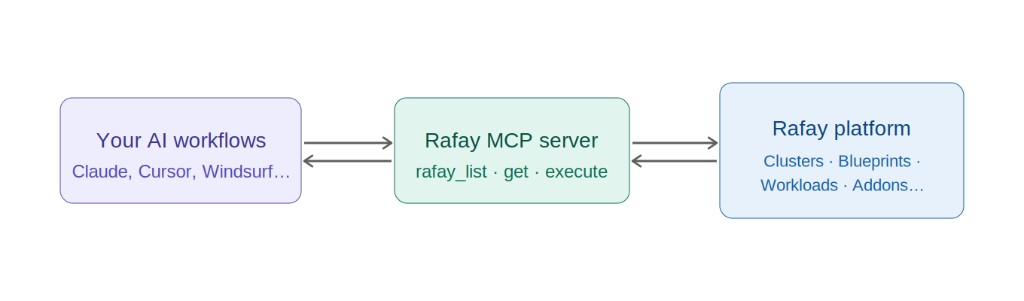
How It Works: Zero-Friction Context Delivery
The Rafay MCP Server operates as a lightweight local or server side mediator. When an engineer asks an AI client a question about their infrastructure, the client uses the MCP protocol to ask the Rafay MCP Server for data.
The server translates that request authenticates against the Rafay Platform using a secure API key fetches the live state via Rafay’s robust APIs, and passes the context back to the LLM.
The AI doesn't bypass your control plane it becomes a participant within it.
Secure by Design: Guardrails for Enterprise AI
Enterprise AI should never become a shortcut around your controls. The Rafay MCP Server works within the same model you already use:
-
Authentication uses a Rafay API key.
-
Authorization is enforced by your existing Rafay RBAC model.
-
Scope is limited to a configured Rafay project.
-
Read-only access in this first release, an AI client can only retrieve what the API key is permitted to see.
As a best practice use least-privilege API keys, store them securely, and rotate them per your organization's policy.
What You Can Do Today:
The theme of this first release is discovery, visibility, and rapid troubleshooting. By giving your AI client visibility into your fleet you drastically lower the cognitive load on SREs and platform engineers. Instead of hunting through multiple dashboard screens running chained kubectl commands, or digging through internal documentation teams can use natural language to inspect:
- Clusters & Managed Add-ons: Quickly map what is running where.
- Blueprints & Versions: Ensure consistency and compliance across environments.
- Namespaces & Workloads: Check live deployments and resource allocations.
- Environments & GitOps Agents: Validate templates and synchronization health.
Real-World Conversational Prompts You Can Try:
- "List all clusters in my development project and flag any that don't match our baseline blueprint version."
- "Show me all the custom add-ons deployed on the production-us-east cluster."
- "Are there any active workloads in the 'testing' namespace for this project?"
- "Summarize the differences between the blueprint versions used in our staging vs production clusters."
See it in Action
Watch the Rafay MCP Server connect to the platform, list clusters, inspect blueprint versions and answer operational questions, all through an AI client.
Get started
Getting started is straightforward point your MCP client at the Rafay MCP Server and provide your Rafay API key, base URL, and project. As always, keep API keys out of source control and shared configuration files.
For full setup instructions and configuration details, see the Rafay MCP Server documentation.
Getting access
Access to the Rafay MCP Server binary is initially gated behind a feature flag. Reach out to Rafay Support to enable it for your organization.
Conclusion
The Rafay MCP Server brings AI-assisted visibility to the Rafay Platform, securely. By connecting MCP-compatible clients through authenticated, RBAC-aware, read-only access, your teams can ask questions in natural language and get the answers they need to understand and troubleshoot their environments.
This is just the first step toward a more conversational way to work with your Kubernetes and platform resources: secure, governed, and built on the platform you already trust.