NVIDIA DGX Spark put a Grace Blackwell-class machine on the desk. It is roughly the size of a hardback book, draws a fraction of the power of a rack server, and ships with 128 GB of unified memory that lets you load models far larger than a typical workstation GPU can hold. For developers, researchers, and platform teams, it is one of the most interesting pieces of AI hardware to appear in a long time.
It also comes with a characteristic that trips up a lot of inference tooling: the DGX Spark is Arm-only. The NVIDIA GB10 Grace Blackwell Superchip pairs a Blackwell GPU with a 20-core Grace CPU powered by Arm (10 Cortex-X925 performance cores and 10 Cortex-A725 efficiency cores) over an NVLink-C2C link. By default, it runs DGX OS, an Ubuntu-based, AArch64 operating system.
Inference stacks that assume amd64 containers, x86 wheels, or x86-only base images do not run here without work.
This is exactly the kind of heterogeneity Rafay's Token Factory is designed to absorb. In this post I will walk through how Token Factory turns a single Arm-based DGX Spark into a managed, multi-tenant LLM serving endpoint, using a real deployment of Qwen2-0.5B-Instruct as the example.
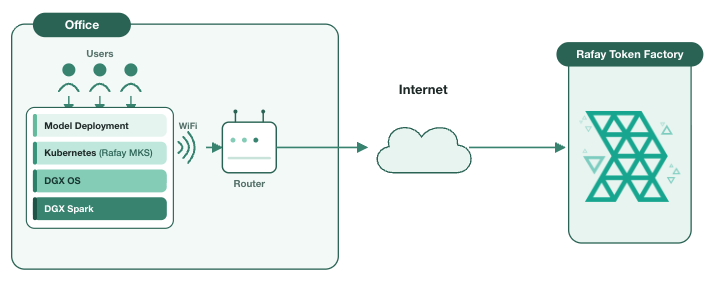
When most teams say "deploy an LLM," they mean a workflow that has been quietly assuming x86 for years. The inference server image is built for amd64. The CUDA wheels are compiled for x86. The orchestration layer schedules onto x86 worker nodes. Most of this stack will require some work to run on a Grace Blackwell box by default.
On the DGX Spark, every layer has to be AArch64-native:
- The container images for the inference engine and its dependencies
- The CUDA and driver stack matched to the Blackwell GPU on the GB10 (compute capability sm_121, which is distinct from data-center Blackwell parts like the B200)
- The Kubernetes node components and the GPU operator that exposes the device to pods
- Any sidecars, gateways, or metering agents that ride alongside the model
The promise of Token Factory is that Rafay invisibly handles this substrate for you. You register the machine as a compute cluster, and from that point on the experience is the same whether the underlying silicon is an x86 H100 server, a GB200 NVL72 rack, or a single Arm DGX Spark on a desk.
Token Factory sits on top of a Kubernetes substrate and exposes LLM inference serving as a set of higher-level objects: a compute cluster (where models run), an endpoint (the network front door), a provider and model (what you are serving), and a model deployment (the running, scalable instance with its inference engine, rate limits, and pricing).
End users never see Kubernetes. They get an OpenAI-compatible API, an API key, and a usage dashboard. The operator/service provider gets multi-tenancy, metering, and governance. The DGX Spark just happens to be the place where the tokens are generated.
Token Factory runs on a Kubernetes substrate, so before any model can be served, the DGX Spark systems need a cluster on it. This is the first place an Arm-only machine needs a different configuration: many Kubernetes distributions and installers still assume x86 worker nodes, ship amd64-only system images, or pull control-plane components that have no aarch64 build. On a Grace Blackwell box, all of that has to be native Arm.
We provision the cluster using Rafay MKS, Rafay's upstream, CNCF-conformant Kubernetes distribution for bare metal and VM environments. MKS is built to run directly on the hardware you bring, and it supports a fully AArch64-native, Arm-only deployment, which is what makes it a fit for the DGX Spark. There is no x86 control-plane node hiding in the topology; the entire cluster runs on the Grace Blackwell silicon.
On a single DGX Spark the result is a compact, single-node cluster where the control plane and the worker role co-reside on the same machine:
- Control plane and kubelet run as AArch64 components on the Spark's Arm cores. The 20-core Grace CPU has more than enough headroom to host the control plane and still leave the bulk of its cores, and the unified memory, for inference.
- The container runtime and CNI are Arm-native. (A common pattern here is to pair a CNI such as Calico or Cilium for pod networking)
- The NVIDIA GPU Operator installs the AArch64 driver, CUDA runtime, and Kubernetes device plugin that expose the GB10's Blackwell GPU to pods. This is the layer that turns "a GPU exists in the box" into "the scheduler can place a model on it," and it is the piece where architecture alignment matters on a non-x86 platform. MKS handles this as part of bringing up a GPU cluster.
Practically, the operator points Rafay at the DGX Spark, which bootstraps Kubernetes and the GPU software stack on the node, and a few minutes later there is a healthy, GPU-aware, Arm-native cluster ready to serve workloads. The DGX Spark is now a Kubernetes node like any other, except that every layer of that stack is AArch64.
The next step is to bring the Kubernetes cluster on DGX Spark under management as a GPU compute cluster. Once the Kubernetes cluster is registered, Token Factory will automatically discover the hardware and surfaces it in the Rafay Console.
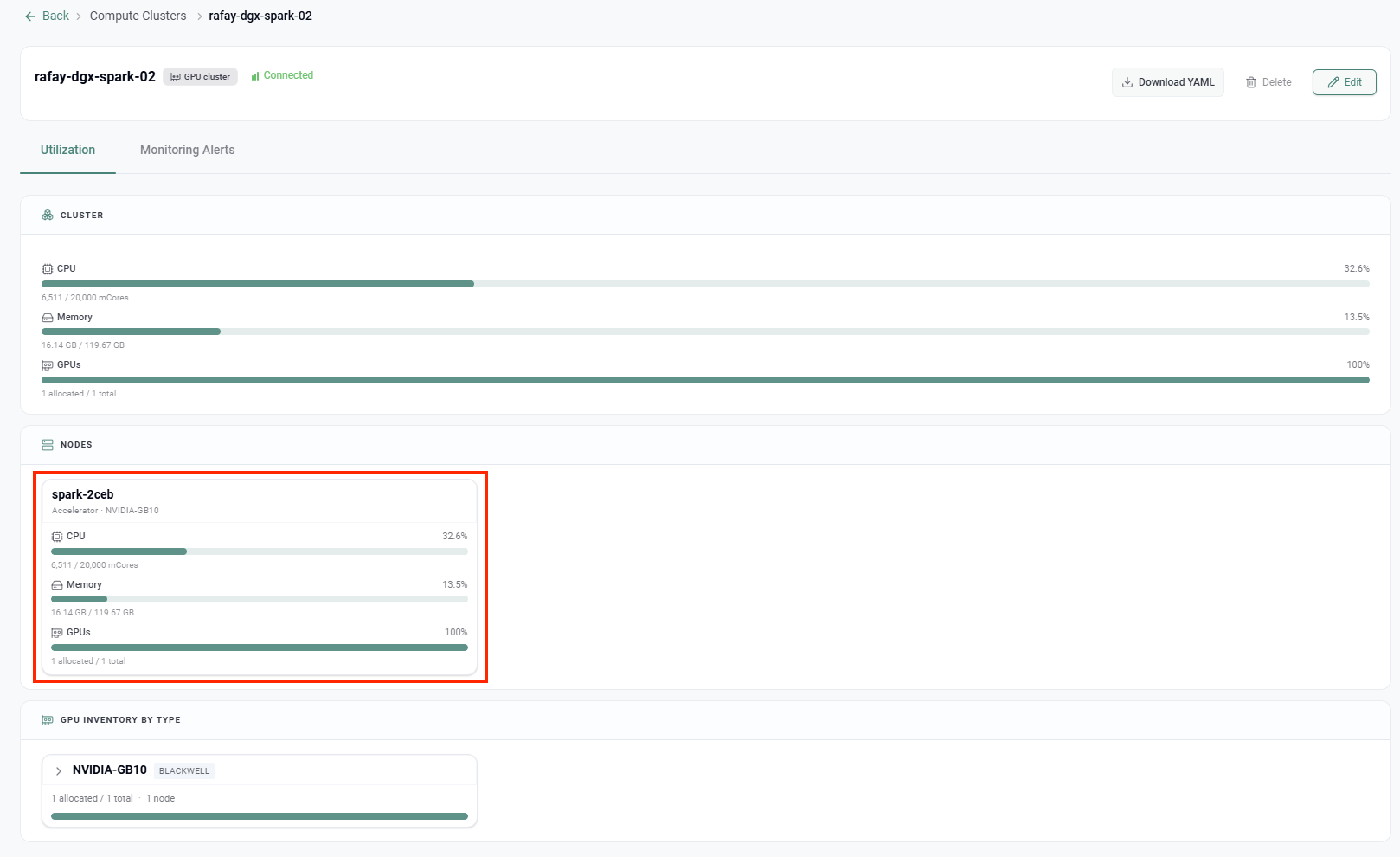
A few things in this view are worth calling out:
- The single node,
spark-2ceb, reports its accelerator as NVIDIA-GB10, and the GPU Inventory by Type panel classifies it as Blackwell. The platform correctly identifies the GB10 silicon rather than treating it as a generic device.
- The CPU panel reads 6,511 / 20,000 mCores. That 20,000 millicore ceiling is the 20 Arm cores of the Grace CPU, visible directly in the dashboard.
- Memory reads 16.14 GB / 119.67 GB. That ~120 GB pool is the DGX Spark's 128 GB of coherent unified memory, which is the whole reason this box can hold sizable models in the first place.
- GPUs show 1 allocated / 1 total at 100%, the single Blackwell GPU on the superchip.
From here, day-2 operations are managed: utilization telemetry, monitoring alerts etc. The DGX Spark is now a first-class citizen of the fleet, indistinguishable in workflow from any other GPU cluster.
With the cluster connected, the operator stitches together the serving objects. In Token Factory terms:
- The endpoint is the addressable front door for inference traffic.
- The provider and model describe what is being served. Here the model is
Qwen2-0.5B-Instruct, a small instruct-tuned model that is a sensible first deployment on a single-GPU box: it loads comfortably into unified memory, serves quickly, and is a clean way to validate the full path before moving to larger models.
- Model sharing controls which tenants and projects can see and consume the model, which is what makes a single DGX Spark useful to more than one team.
Info
Note that none of these objects care about the CPU architecture underneath. The endpoint and model abstractions are the same on Arm as on x86, which is the point.
The model deployment is where everything comes together: the model, the endpoint, the target GPU, the inference engine, rate limits, and pricing. This is the screen the operator fills in to actually bring the model online.
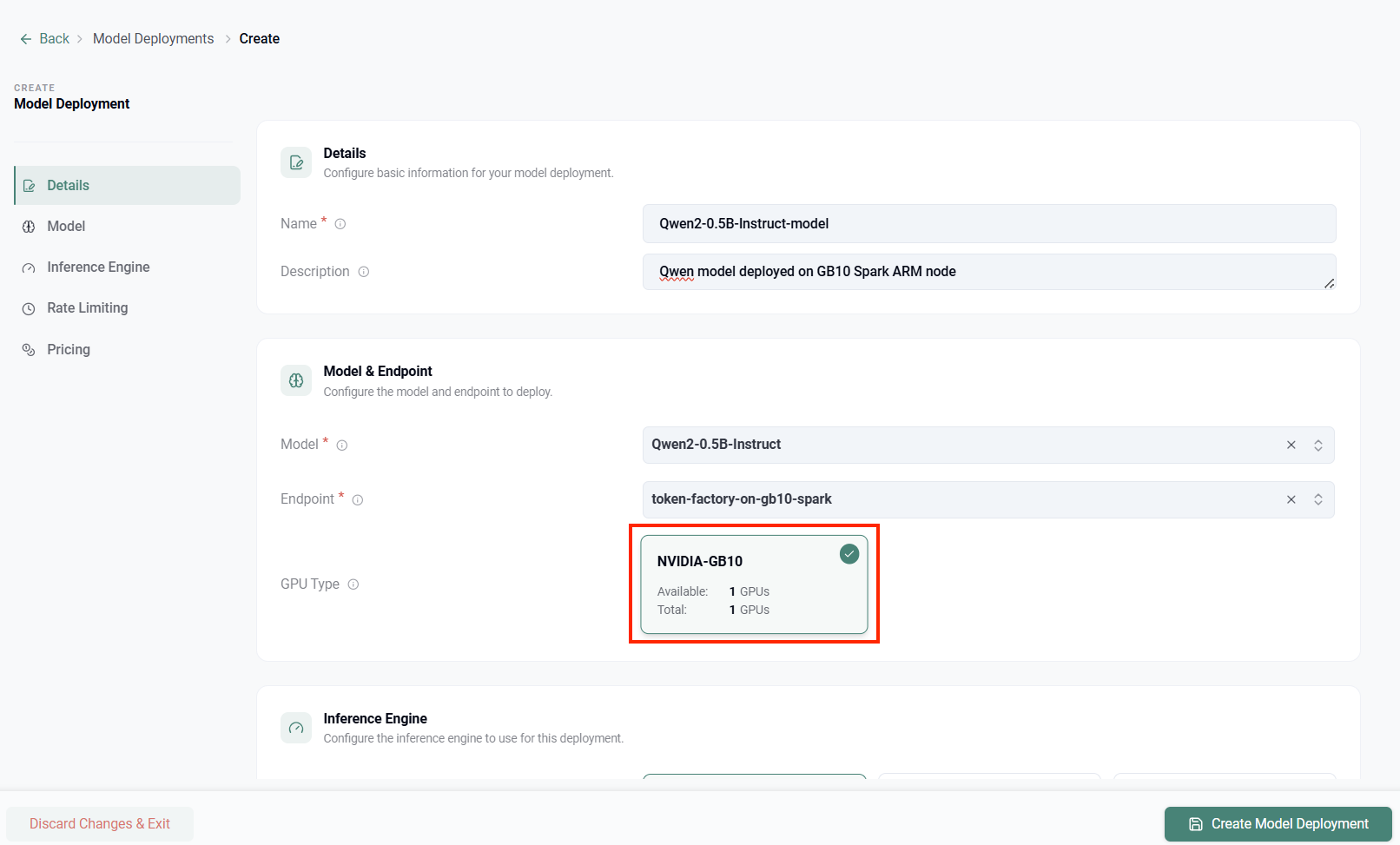
Reading down the form:
- Details name the deployment
Qwen2-0.5B-Instruct-model
- Model & Endpoint bind
Qwen2-0.5B-Instruct to the token-factory-on-gb10-spark endpoint.
- GPU Type is the important part. Token Factory presents NVIDIA-GB10 as a selectable target with 1 GPU available of 1 total, and the deployment is pinned to it. The platform has already done the hard scheduling work of matching the model to the Blackwell GPU on the Arm node. The operator simply selects it.
- The remaining sections, Inference Engine, Rate Limiting, and Pricing, configure how the model is served, how aggressively clients can call it, and how usage is metered and charged back.
- Click Create Model Deployment, and the model comes online on the DGX Spark.
Info
Behind that Inference Engine selection is where the Arm-native heavy lifting lives. Token Factory pulls AArch64 inference-engine images and the matching CUDA stack for the GB10, schedules the serving pod onto the Spark node via the GPU operator, and wires it to the endpoint. The operator never builds an Arm container, never recompiles a wheel, and never debugs an architecture mismatch. They pick an engine from a dropdown.
Once deployed, the DGX Spark behaves like a managed inference service, not a hobbyist's desktop experiment:
- End users consume an OpenAI-compatible API. They generate API keys, send requests, and watch their own usage dashboards. They have no idea, and no need to know, that the tokens are coming off an Arm-based superchip under someone's desk.
- Rate limiting protects the single GPU from being overwhelmed by any one tenant, which matters far more on a one-GPU box than on a large cluster.
- Usage metering and pricing make the deployment chargeable, so even a desktop-class machine can participate in showback or a paid internal service.
- Multi-tenancy and model sharing let several teams share the one DGX Spark with isolation and quotas, turning a single device into shared infrastructure.
Scaling is the natural next move. The same workflow that brought up one DGX Spark brings up a second, and NVIDIA's own design anticipates this: two Sparks can be linked over ConnectX networking into a 256 GB combined-memory pair for models in the 405B-parameter range. Token Factory treats those as additional capacity in the fleet, and the model-deployment abstraction is unchanged.
The DGX Spark is a preview of where a lot of AI compute is heading: Arm-based, memory-rich, energy-efficient, and increasingly distributed out toward the edge rather than concentrated in a few data centers. The hardware is genuinely exciting. The operational reality, an AArch64 stack that is not aligned with x86 assumptions at every layer, is where most teams lose weeks.
Rafay Token Factory collapses that gap. The same five-object workflow, compute cluster, endpoint, provider and model, model deployment, and end-user consumption, applies whether the silicon is x86 or Arm, a single desktop or a rack-scale GB200 system. You register the machine, pick the GPU, pick the engine, and serve tokens. The architecture under the hood becomes an implementation detail, which is exactly what platform software is supposed to do.
A Grace Blackwell machine on your desk, serving a production-style LLM endpoint with metering, rate limits, and multi-tenancy, and no one had to think about Arm. That is the whole idea!
 Live Demo