NUMA-Aware GPU VMs: How NVIDIA's Reference Architecture Actually Fixes It
In Part 1 of the blog series, we walked through the basics: NUMA nodes, remote-access penalties, and why a GPU VM that doesn't know its own topology can quietly sabotage itself by pinning a hot thread to one vCPU while its data lands on a memory bank a socket away.
We ended with a question we didn't answer: what does the fix actually look like in practice?
NVIDIA has published a prescriptive recommendation called Performance Reference Architecture. It's worth walking through this in some detail, because it's the closest thing to an industry-standard answer for how do I make a GPU VM behave like bare metal?.
The Problem Statement
AI frameworks like PyTorch need accurate information about GPU placement, NIC placement, NUMA configuration, and interconnect topology (PCIe switch vs. NVLink) in order to build efficient communication paths for collective operations. If you get that topology wrong or hide it entirely behind a virtualized abstraction, the framework has no way to know it's making a bad choice.
NCCL in particular leans hard on topology accuracy to route multi-GPU collective communication, and in a virtualized environment where the VM thinks its resources are uniformly accessible, that routing can quietly degrade into cross-socket, cross-switch traffic that adds real latency to every training step or inference batch. That's the cost of getting this wrong.
NVIDIA's Recommendation
Here's what NVIDIA recommends in their performance reference architecture.
Rule 1: Colocate Everything on the Same Node
Everything boils down to one governing principle: a GPU VM's vCPUs, its memory, and every PCIe device it touches — GPUs, NICs, storage controllers should live on the same physical CPU socket and NUMA node. Bandwidth and latency between any of those devices and system memory is only as good as the shortest path between them, and the shortest path is the one that never leaves a single socket.
For example, on an 8-GPU HGX server split into two half-sized VMs, that means one VM gets vCPUs pinned to socket 0, memory allocated from NUMA node 0, and GPUs 0–3, NICs 0–3, and storage controllers 0–5. The other VM gets the mirror-image assignment on socket 1.
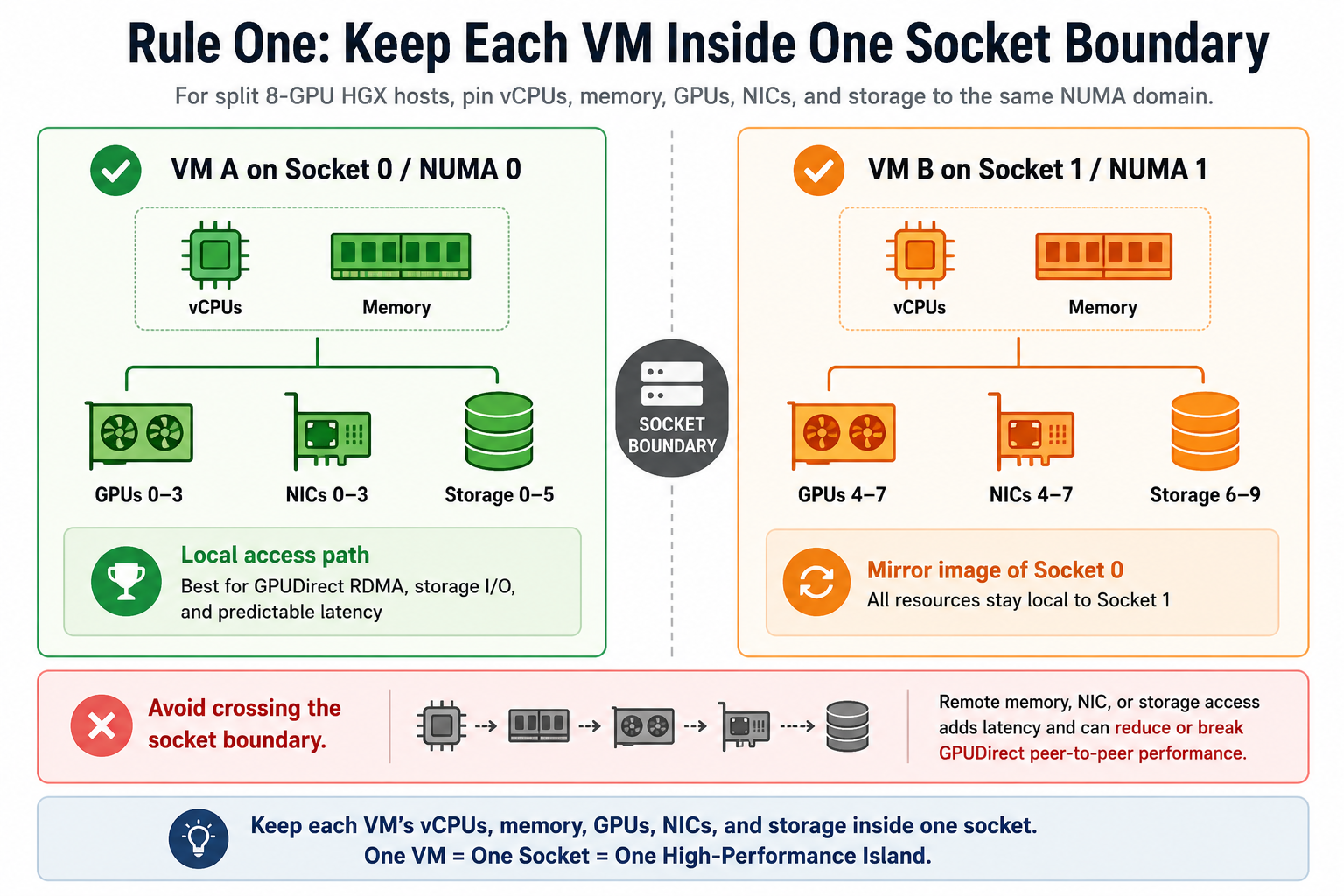
If a workload's resource needs exceed what a single socket can offer, NVIDIA is explicit that crossing sockets is a real tradeoff, not a free scale-out. This means that memory on the far socket costs more to reach, and PCIe peer-to-peer between devices on different sockets doesn't work at all.
GPUDirect RDMA and GPUDirect Storage both depend on that peer-to-peer path, so best performance requires GPUs and their peer NICs or storage controllers to sit below the same PCIe switch. HGX's all-to-all NVLink fabric between GPUs takes some of the pressure off GPU-to-GPU traffic specifically, but it doesn't change the story for GPU-to-NIC or GPU-to-storage paths.
The reference architecture actually ranks this precisely, from best to worst:
- GPU and peer device below the same PCIe switch — the target configuration for GPUDirect RDMA/Storage.
- GPU and peer device below a common (stacked) PCIe switch — only relevant on servers where switches are chained; doesn't apply to the flat 8-GPU HGX topology used in the reference build.
- GPU and peer device below a common PCIe root complex / NUMA node — works, but every hop beyond a single switch adds latency.
- GPU and peer device on separate NUMA nodes — degraded further; still on the same socket in some topologies, still crossing more silicon than necessary.
- GPU and peer device on separate CPU sockets — GPUDirect simply doesn't operate here. Not a slower path; no path.
That ordering is the practical checklist for device selection when a platform is deciding which NIC or storage controller to expose alongside which GPU in a given VM. In a nutshell, it is not just same socket good, different socket bad. It is a real gradient.
Rule 2: Match the Guest's virtual topology with the physical topology
Colocating physical resources only helps if the guest can see that colocation. This is where NVIDIA's guidance gets specific, and gives platform builders two distinct implementation paths.
Option A: Mirroring
Mirror the physical hierarchy inside the VM's virtual hardware. This means the guest's virtual CPU topology, NUMA layout, and PCIe device tree are all reconstructed to match the host, at the libvirt domain-XML level, in three layers:
1. Virtual NUMA topology.
The domain XML defines virtual CPU sockets and NUMA cells that mirror the physical layout determined ahead of time with lstopo or lscpu. So, a two-socket, 80-vCPU host presents as two distinct NUMA nodes inside the guest, each with roughly half the RAM, instead of one undifferentiated pool.
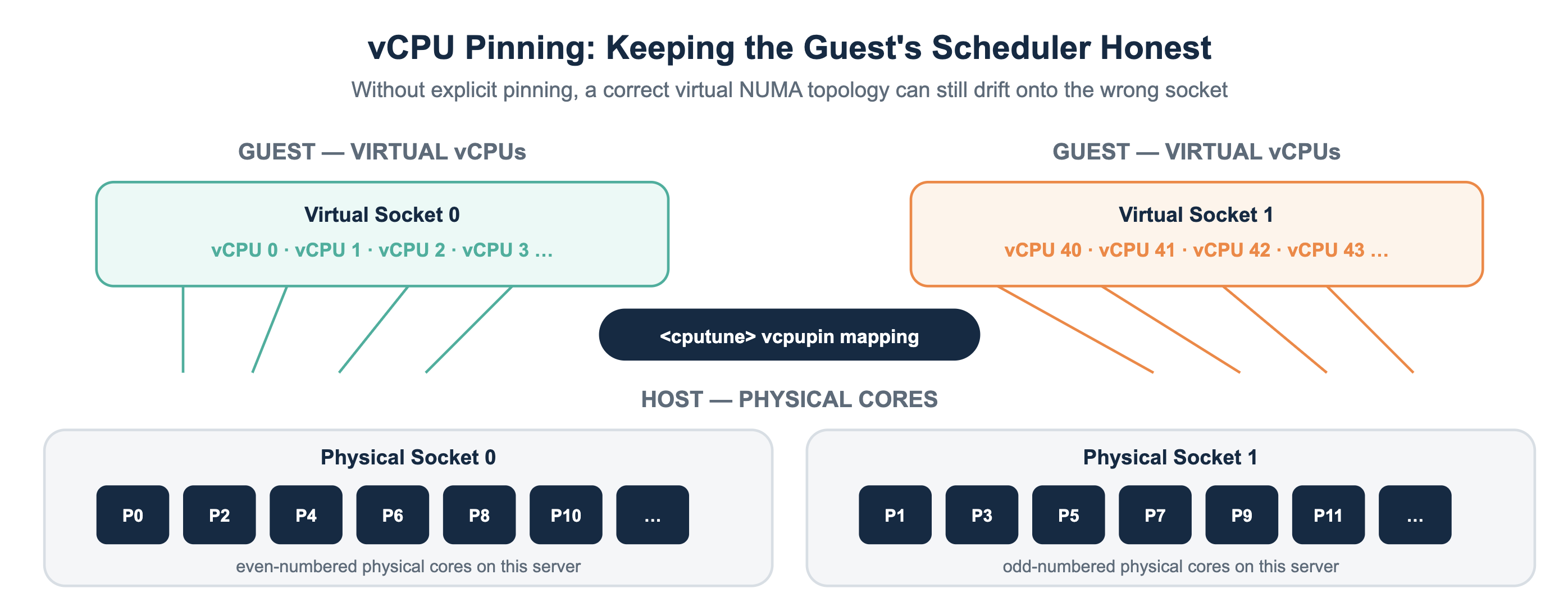
2. vCPU pinning.
Every vCPU gets explicitly pinned to a physical core via the cputune/vcpupin elements, so the hypervisor's scheduler can't quietly drift a vCPU onto the wrong socket over time. Without this, a correctly-defined virtual NUMA topology can still get undermined by a scheduler that's free to move threads around.
3. Virtual PCIe hierarchy.
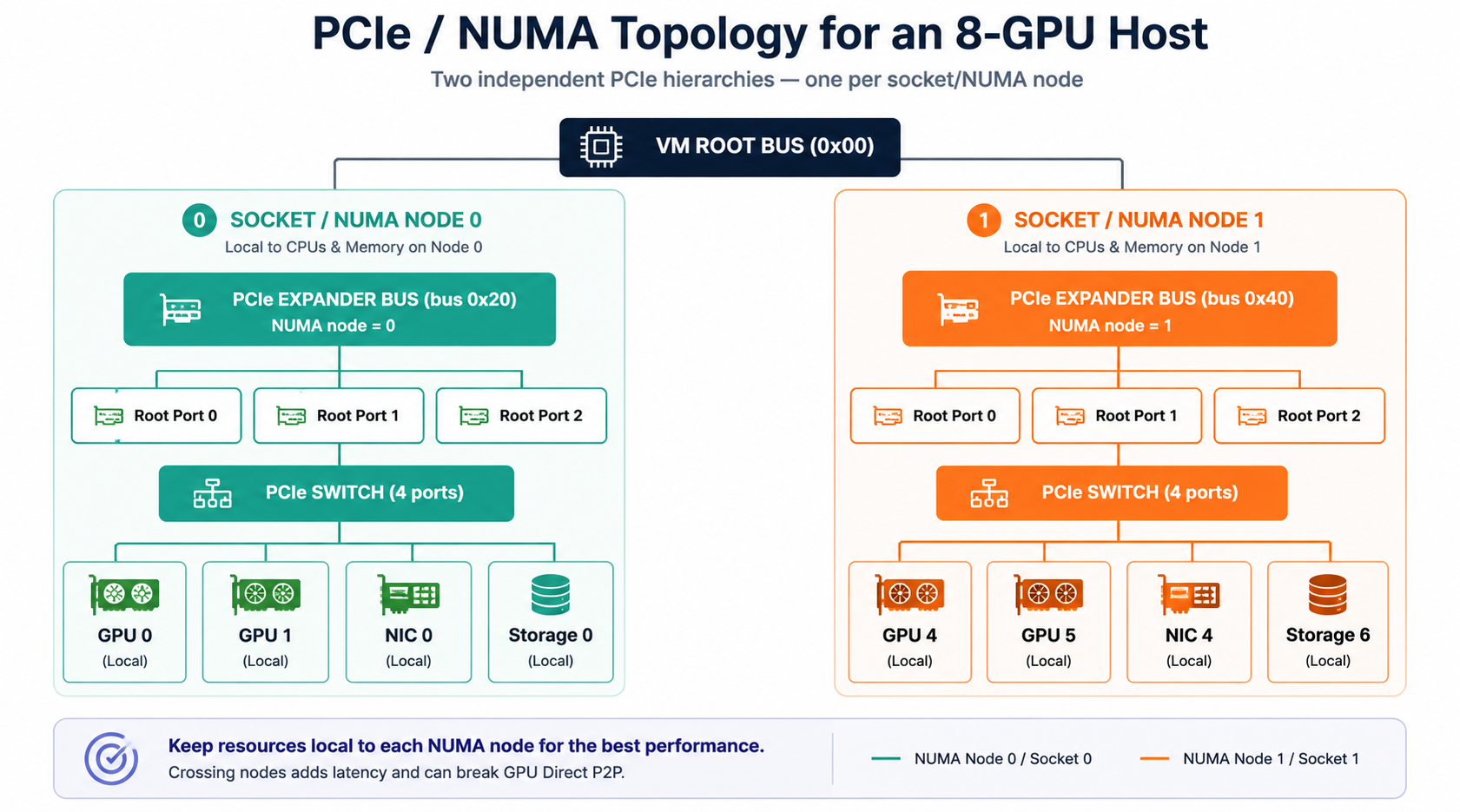
This is the step that's easy to skip and expensive to skip. NVIDIA's approach uses virtual PCIe Expander Bus devices — one per virtual NUMA node — with PCIe root ports and switches built underneath each one.
Every device attached below a given expander bus automatically inherits that bus's NUMA affinity. Passthrough GPUs, NICs, and storage controllers then get wired into the matching virtual switch, so tools running inside the guest — lstopo, nvidia-smi topo -m — report an accurate picture instead of a flattened one. This is the guest-side fix for exactly the "Item 3" problem from Part 1: the guest no longer assumes a uniform machine, because its own virtual hardware tells it otherwise.
Option B: Patch NCCL Topology File
Leave the virtual hardware alone and patch NCCL's topology file directly. Instead of reconstructing the PCIe hierarchy in the domain XML, this approach edits NCCL's own topology XML to reflect the VM's resources in their real enumeration order against the underlying physical topology.
This is a much narrower fix in the sense that it corrects what NCCL sees, not what the guest OS or other topology-aware tooling sees. However, it's considerably less domain-XML surgery for teams that mainly care about multi-GPU collective communication performance and less about every other topology-sensitive tool in the guest.
Info
Both options are legitimate. The choice is really a question of how much of the guest's view of the world you need to correct versus how much surface area you're willing to maintain.
Host-side Prerequisites
A few pieces have to be right underneath the VM before the guest-side configuration matters at all:
| Recommendation | Why it matters |
|---|---|
| Know the physical topology before you touch anything. | lstopo -sv is the tool NVIDIA points to for mapping a server’s real NUMA and PCIe layout — the starting input for every decision that follows. |
| Turn on latency-sensitive performance mode, if the server vendor exposes one in firmware. | It is a small setting with an outsized effect on tail latency for these kinds of workloads. |
| Enable ATS on NICs and configure ACS on PCIe switches and root ports. | GPUDirect RDMA depends on both being set correctly, along with the nvidia-peermem kernel module being loaded. Skipping this quietly caps GPUDirect performance even if every other placement decision is correct. |
| Treat NUMA-per-socket (NPS) as a real tradeoff, not a default to leave alone. | Reducing NPS simplifies the PCIe device and core mapping a platform team has to reason about — fewer virtual NUMA nodes to build hierarchy for — at some potential performance cost. NVIDIA does not prescribe a universal answer here, which means the right setting depends on workload mix, not on a single best practice. |
Run nvidia-fabricmanager inside the guest for full-passthrough NVLink setups. |
When every GPU on an HGX baseboard goes to a single VM, the NVLink switches get passed through as well, and Fabric Manager must run inside the guest for the GPUs to establish NVLink connectivity correctly among themselves. |
Why does this belong in the Platform?
Here's the part that matters most for anyone operating a GPU PaaS rather than hand-building one VM: everything above is currently a manual, per-VM exercise. Someone has to run lstopo, work out the physical topology, hand-edit libvirt domain XML with the correct NUMA cells and PCIe expander bus hierarchy, get the vcpupin mappings right, and verify the result for every VM shape, on every host generation, every time hardware changes.
This is exactly the kind of repetitive, error-prone, topology-sensitive work that a platform's provisioning layer should be doing automatically, not something tenants/users should be expected to reconstruct from a reference architecture document on a deployment-by-deployment basis.
The Rafay GPU PaaS control plane already knows a host's physical NUMA and PCIe layout because it inventoried the hardware once. Therefore, it can generate the correct virtual CPU topology, vCPU pinning map, and PCIe expander bus hierarchy for every GPU VM it provisions, consistently, without an operator ever opening a domain XML file by hand.
This is the difference between a GPU cloud that occasionally, mysteriously underperforms its own hardware, and one that reliably delivers what the silicon is actually capable of every time a VM is provisioned by a tenant.
Considerations
There are two constraints that are worth calling out clearly because they shape what a NUMA-aware platform can and cannot promise a tenant. Neither of these is a reason to avoid GPU passthrough.
1. No Live Migration with GPU Passthrough.
A VM configured with full GPU passthrough — which is what makes near-bare-metal performance possible in the first place — can't be live-migrated. Maintenance, host draining, and failover for these VMs need a different mechanism than the one platform teams reach for by default with ordinary VMs.
2. Shared NVSwitch multi-tenancy needs Custom Engineering.
Splitting one HGX baseboard's NVSwitch fabric across multiple VMs (e.g. two VMs with four GPUs each) requires partitioning the NVSwitch fabric with a custom client built against the Fabric Manager SDK.
Try It Out
Sign up here for a free trial and try it out yourself. Get Started includes a number of hands-on exercises to help you get familiar with the capabilities of Rafay's GPU PaaS Platform.
-
Free Org
Sign up for a free Org and try the Rafay Platform with our Get Started guides.
-
 Live Demo
Schedule time with us to watch a demo in action.