Certifying Tenant GPU Kubernetes Clusters with NVIDIA Cluster Readiness Engine
For tenants of a neocloud, provisioning a GPU Kubernetes cluster is only part of the job. Before handing over newly provisioned cluster to a tenant, the provider needs confidence that the underlying GPU infrastructure is actually ready to run AI workloads.
Kubernetes nodes may report Ready, GPUs may appear as allocatable resources, and the NVIDIA GPU Operator may be healthy. But, none of these checks prove that GPUs across multiple nodes can communicate correctly or successfully execute distributed workloads.
This is the exact problem NVIDIA Cluster Readiness Engine (NVCRE) attempts to address.
NVCRE provides a Kubernetes-native framework for running GPU cluster certification tests. Rather than validating infrastructure solely through health checks, NVCRE executes real GPU workloads—including NCCL communication tests, GPU diagnostics, and distributed training workloads—and produces a certification result. For a neocloud, this can provide a powerful operating model: "Provision → Configure → Certify → Hand Off to Tenant"
In this blog, we’ll walk through a simple example using a two-node Kubernetes cluster with NVIDIA A10 GPUs and show how the same workflow can become part of a neocloud’s automated Kubernetes cluster delivery process.
Why “Kubernetes Ready” Isn’t Necessarily “AI Ready”
A newly provisioned GPU Kubernetes cluster might pass several infrastructure checks:
| Check | Status |
|---|---|
| Kubernetes API | ✓ |
| Nodes Ready | ✓ |
| GPU Operator | ✓ |
| GPUs Allocatable | ✓ |
| Networking | ✓ |
These checks are necessary, but distributed AI workloads exercise infrastructure differently.
Training and other distributed GPU workloads frequently use the NVIDIA Collective Communications Library (NCCL) to perform collective operations such as AllReduce across GPUs.
A problem with the GPU software stack, network configuration, GPU communication path, or individual hardware components may therefore only become apparent when an actual distributed workload runs.
- For a tenant, discovering these problems after cluster handoff means lost engineering time and GPU capacity.
- For a neocloud, it means support tickets, troubleshooting effort, and potentially an SLA-impacting incident.
A better approach is to validate the cluster before the tenant receives it.
Adding Certification to the Neocloud Provisioning Lifecycle
Consider a neocloud offering dedicated GPU enabled Kubernetes cluster. With NVCRE, the neocloud can introduce another gate before handoff.
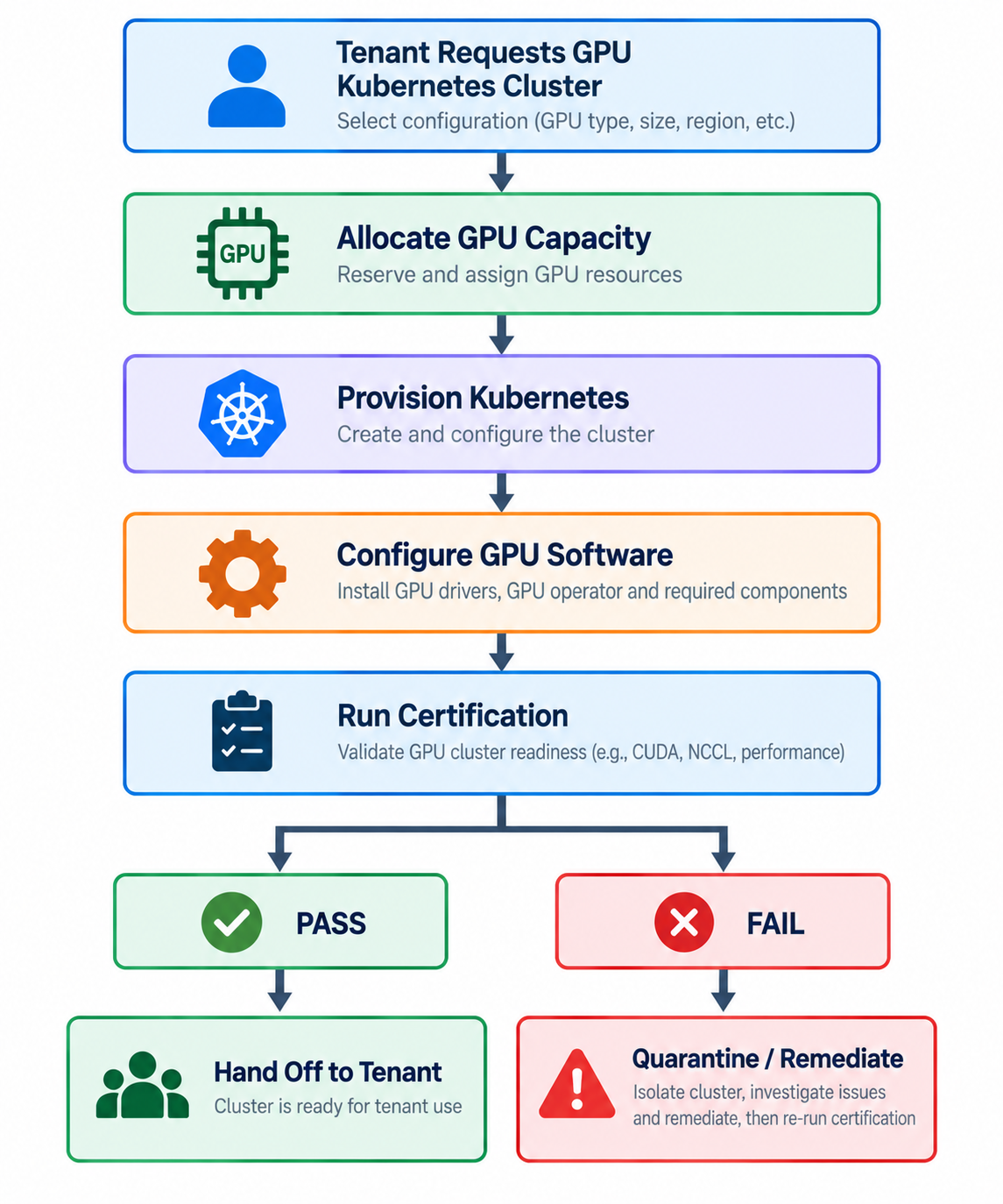
With the above process, only clusters that successfully pass the provider’s certification policy would be released to tenants. This changes cluster readiness from an assumption into something that can be tested and validated.
Example: Certifying a Two-Node A10 Kubernetes Cluster
To demonstrate the workflow, we’ll use a small GPU based Kubernetes cluster consisting of the following:
| Configuration | Value |
|---|---|
| Kubernetes Nodes | 2 |
| GPU | NVIDIA A10 |
| GPUs per Node | 1 |
| Total GPUs | 2 |
| GPU Management | NVIDIA GPU Operator |
| Monitoring | Prometheus |
| Certification | NVIDIA Cluster Readiness Engine |
| Certification Test | NCCL AllReduce |
Our workflow consists of the following steps:
- Provision the tenant Kubernetes cluster
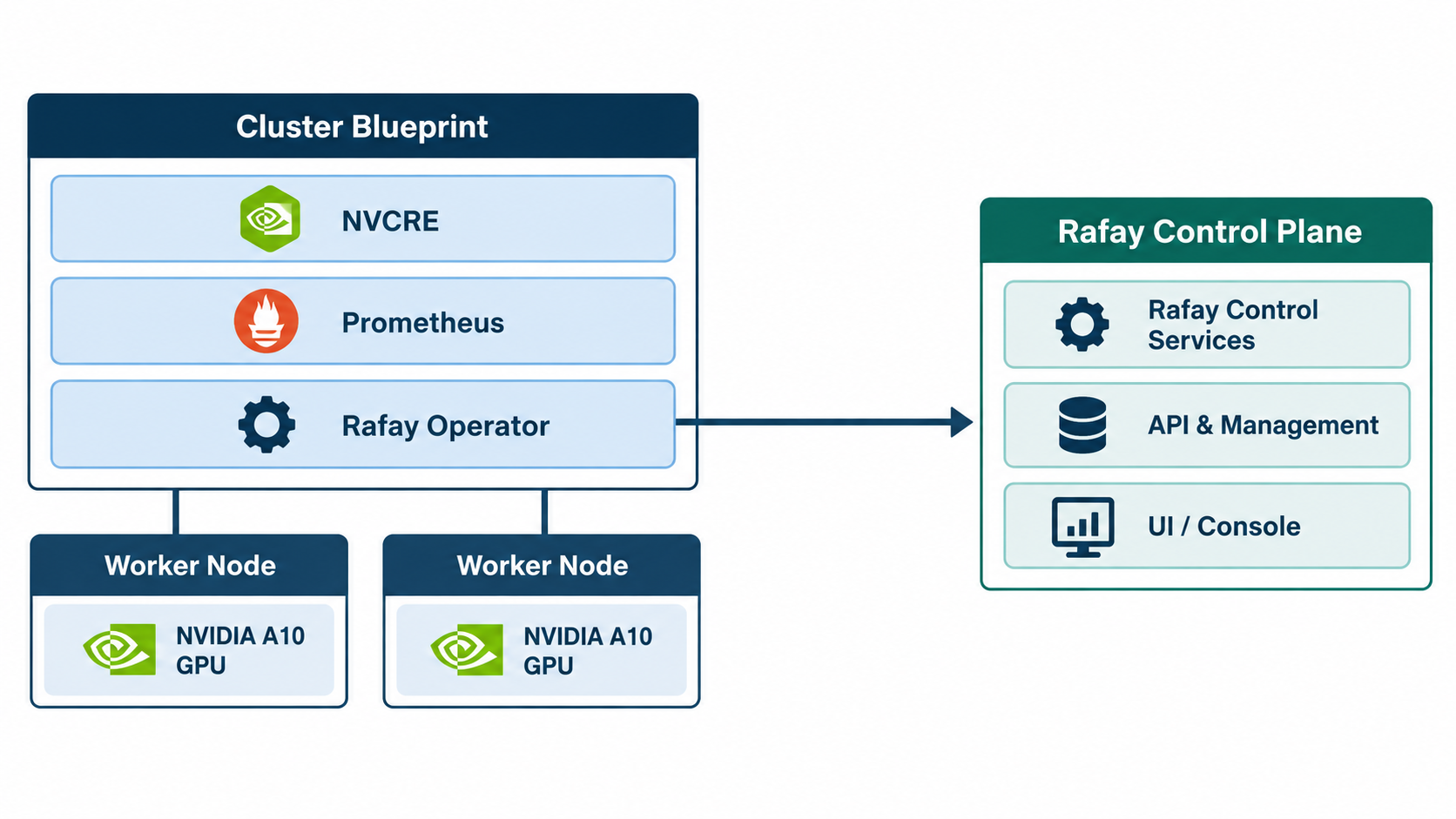
- Deploy NVIDIA GPU Operator and NVCRE as add-ons in a standardized cluster blueprint
- Define the provider’s certification
- Run the certification before tenant handoff
Step 1 — Provision the Tenant Kubernetes Cluster
The neocloud first provisions a two-node Kubernetes cluster using its standard tenant provisioning workflow (typically a self service experience). Each worker node in our example has one NVIDIA A10 GPU, giving the tenant cluster two GPUs.
You can verify the nodes by typing "kubectl get nodes". Both workers should report STATUS as Ready. At this point the Kubernetes control plane considers the nodes healthy.
But this should not yet be the provider’s definition of tenant ready.
Step 2 — Configure the NVIDIA GPU Stack
Next, the NVIDIA GPU Operator is deployed to the cluster. The GPU Operator automates the management of NVIDIA software components required for Kubernetes GPU workloads, including components such as:
- NVIDIA GPU drivers
- NVIDIA Container Toolkit
- Kubernetes device plugin
- GPU Feature Discovery
- DCGM
- DCGM Exporter
- MIG Manager
For a neocloud, the GPU Operator would typically be part of a standardized Kubernetes cluster blueprint that is applied automatically during provisioning. Once deployed, you can verify that Kubernetes sees the expected GPU capacity. The cluster blueprint will also typically carry Prometheus as a standard observability add-on deployed with tenant Kubernetes clusters.
For our environment, each worker exposes 1 GPU. This validates GPU discovery and Kubernetes resource advertisement.
But we still haven’t tested whether the two GPUs can successfully participate in a distributed workload.
The provider can therefore incorporate the NVCRE prerequisites into the same standardized cluster configuration used for GPU Operator, monitoring, networking, storage, and other infrastructure services.
Step 2a — Configure NCVRE
Install the nvcrectl CLI:
curl -fsSL https://github.com/NVIDIA/cluster-readiness-engine/releases/latest/download/installer | bash
NVCRE uses the current Kubernetes context, so the provider’s provisioning or validation system can run the certification against the newly created tenant cluster. It is a good idea to inspect the cluster before running certification.
nvcrectl cluster info
For our test cluster, NVCRE detected and reported the following:
Platform:     onprem
GPU:          NVIDIA-A10 (a10, 1 GPUs/node)
Nodes:        2 ready
Total GPUs:   2
This gives the provider another useful pre-handoff validation:
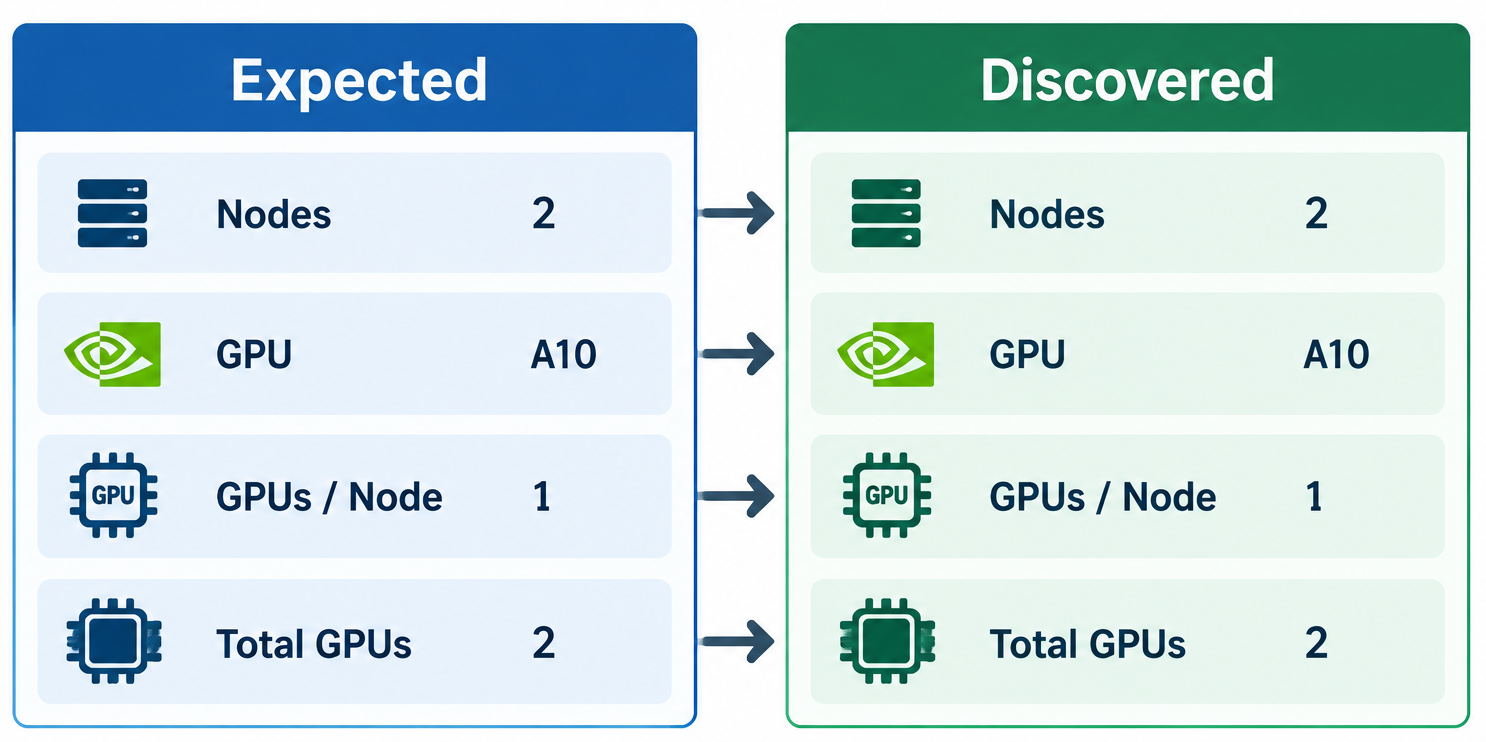
Does the GPU inventory NVCRE discovers match the SKU the tenant ordered?
For example, if the tenant ordered a two-node A10 cluster with one GPU per node, the expected inventory is as follows. A mismatch can prevent the cluster from progressing to certification and tenant handoff.

Step 3 — Define the Neocloud’s Certification Policy
NVCRE certifications are defined using Kubernetes custom resources. This is particularly useful for neoclouds because the certification definition can become part of the provider’s standard GPU cluster qualification policy. For our example, we’ll validate multi-node NCCL AllReduce communication. A certification definition targets the GPU nodes and selects the required certification category:
apiVersion: nvcre.nvidia.com/v1alpha1
kind: Certification
metadata:
  name: gpu-cluster-cert
spec:
  target:
    nodeSelector:
      nvidia.com/gpu.present: "true"
  categories:
    - domain: communication
      variant: nccl-all-reduce
The exact certification policy could vary based on the GPU SKU being delivered.
For example:
- Single GPU Kubernetes GPU diagnostics
- Multi-GPU Node Single-node NCCL
- Multi-Node GPU Cluster Multi-node NCCL
- Training Cluster NCCL + distributed training
- Premium GPU Cluster Diagnostics + NCCL + training
This lets the provider align the depth of certification with the service being sold.
Important
Some of the NVCRE tests can take several hours to run. Neoclouds should select certification tests that match user requirements
Account for the Actual GPU Topology
One practical consideration is ensuring that NVCRE’s certification definition matches the physical GPU topology of the tenant cluster. Our nodes each contain one A10 GPU. The NVCRE catalog assumes four GPUs per node for A10 in this scenario. Without an override, the certification pods could request more GPUs than are available on each worker.
We therefore need to explicitly configure: "gpusPerNode: 1". This is particularly important for a neocloud because the same GPU model may be offered through multiple SKUs.
Info
Certification parameters should be generated from the actual SKU topology rather than assuming a fixed configuration.
Step 6 — Certify the Cluster
Now run the certification:
nvcrectl certification run --cert-file certification.yaml --wait
NVCRE creates the resources required for the certification and executes the NCCL workload. For our cluster:
Categories:
  - communication/nccl-all-reduce
[watch] communication/nccl-all-reduce: InProgress (0s)
[watch] communication/nccl-all-reduce: InProgress (15s)
[watch] communication/nccl-all-reduce: InProgress (30s)
[watch] communication/nccl-all-reduce: InProgress (45s)
[watch] communication/nccl-all-reduce: InProgress (1m0s)
[watch] communication/nccl-all-reduce: InProgress (1m15s)
[watch] communication/nccl-all-reduce: InProgress (1m30s)
[watch] communication/nccl-all-reduce: Succeeded (1m31s)
[watch] Certification succeeded. (1m31s)
NVCRE then produced the certification report:
Certification Report
Name:      gpu-cluster-cert
Platform:  onprem
GPU:       a10
Nodes:     2
communication/nccl-all-reduce
Status:    Succeeded
Runtime:   1m 31s
Scale:     full-scale
Nodes/Job: 2
Jobs:      1
Bandwidth:
  Size       AlgBW        BusBW
  2 GB       1.50 GB/s    1.50 GB/s
Summary
Categories:   1/1 passed
Failed Nodes: none
Result:       PASSED
This gives the provider substantially stronger evidence of readiness than simply checking node status. The test confirms the following and the cluster can now progress to tenant handoff.
Kubernetes Nodes Ready          ✓
Correct GPU Inventory           ✓
GPU Operator Healthy            ✓
GPU Scheduling                  ✓
Multi-Node NCCL Communication   ✓
Distributed GPU Workload        ✓
CERTIFICATION                   PASSED
What Happens When Certification Fails?
The failure path is arguably even more valuable to a neocloud. Suppose a newly provisioned eight-node GPU cluster fails an NCCL certification. The infrastructure problem can be discovered before it becomes the tenant’s problem.
NVCRE itself provides the certification evidence and identifies failures rather than automatically taking actions such as draining or repairing nodes. This allows the neocloud’s orchestration platform to determine the appropriate remediation workflow.
From GPU Capacity to Certified GPU Infrastructure
GPU clouds increasingly compete on more than access to GPUs. Enterprise AI teams expect GPU infrastructure that is repeatable, observable, reliable, and ready to run workloads when capacity is delivered.
NVIDIA Cluster Readiness Engine provides neoclouds with a mechanism to validate that readiness using actual GPU workloads.
In our simple example, NVCRE validated a two-node Kubernetes cluster containing two NVIDIA A10 GPUs. At neocloud scale, the more interesting outcome is the workflow this enables: Provision → Validate → Certify → Deliver
Instead of handing tenants Kubernetes clusters that should work, a neocloud can build a service where GPU clusters are tested and certified before they are released to customers. By integrating certification into the GPU cloud control plane, the same process can be repeated after hardware replacement, cluster expansion, upgrades, maintenance, or tenant reuse.
-
Free Org
Sign up for a free Org if you want to try this yourself with our Get Started guides.
-
 Live Demo
Schedule time with us to watch a demo in action.