Oct
v4.3 Update 5 - SaaS
29 Oct, 2026
This release includes the following enhancements and bug fixes.
Google GKE
Cloud Credentials Update and Validation
Updating a GKE cloud credential now saves the new GCP service-account key immediately. Clusters keep the previous key until the next cluster operation (upgrade, scale, node pool change, or delete). That operation writes the latest saved key before talking to GCP.
The console warns when you change a key that clusters still use. You can also switch the credential from the cluster Configuration tab. Deleting a credential that is in use still fails, and the error now names the clusters.
Benefit
Rotate a GCP service-account key without leaving clusters on the provision-time key, so the next upgrade, scale, or delete authenticates with the latest saved credential.
Note
rctl and Terraform do not show the in-use warning when you update a GCP credential. The console does.
For details, see Day-2 Updates.
Blueprints and Add-ons
Optional Add-Ons
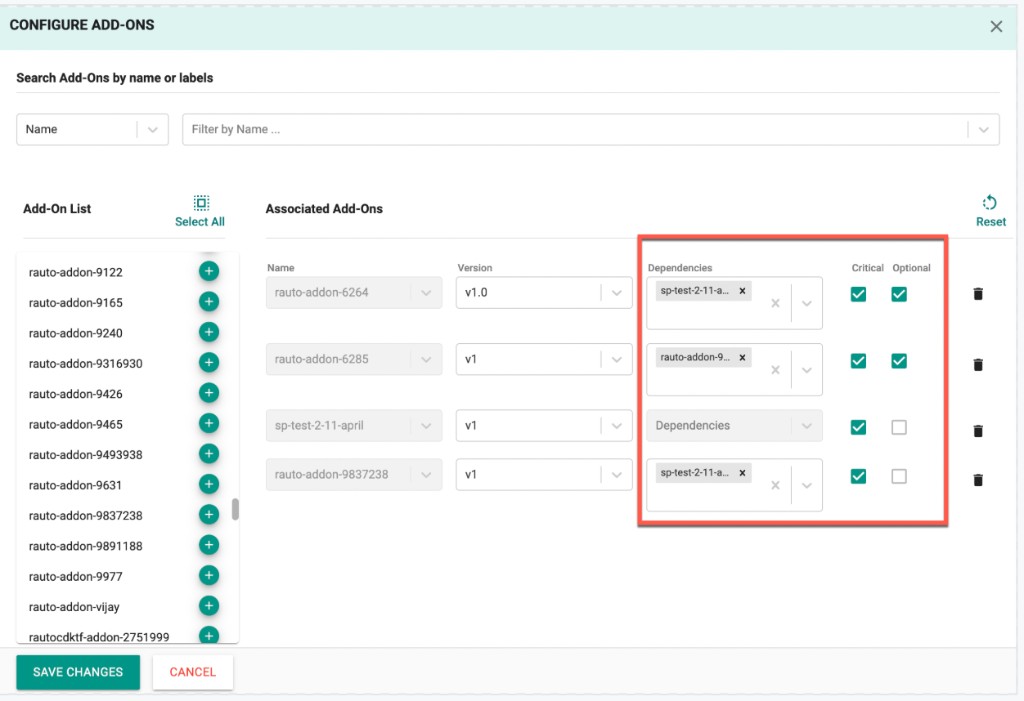
Custom add-ons in a blueprint can now be marked Optional. Add-ons are mandatory by default. Optional add-ons are not deployed unless they are selected when the blueprint is deployed, updated, or synced on a cluster. Clusters created from the same blueprint can therefore run different subsets of optional add-ons. Optionality is independent of add-on criticality, applies to all cluster types, and is supported in the UI, RCTL, Terraform, and API.
Benefit
Use one blueprint across clusters while letting each cluster opt in to only the add-ons it needs.
When you configure add-ons on a blueprint, enable Optional next to Critical for any custom add-on that should be selectable per cluster.
When updating the blueprint on a cluster, the Update Blueprint dialog shows an Optional Add-Ons panel. Move add-ons from Available add-ons to Selected add-ons, or use Select All / Clear. Only mandatory add-ons and the add-ons selected here are deployed.
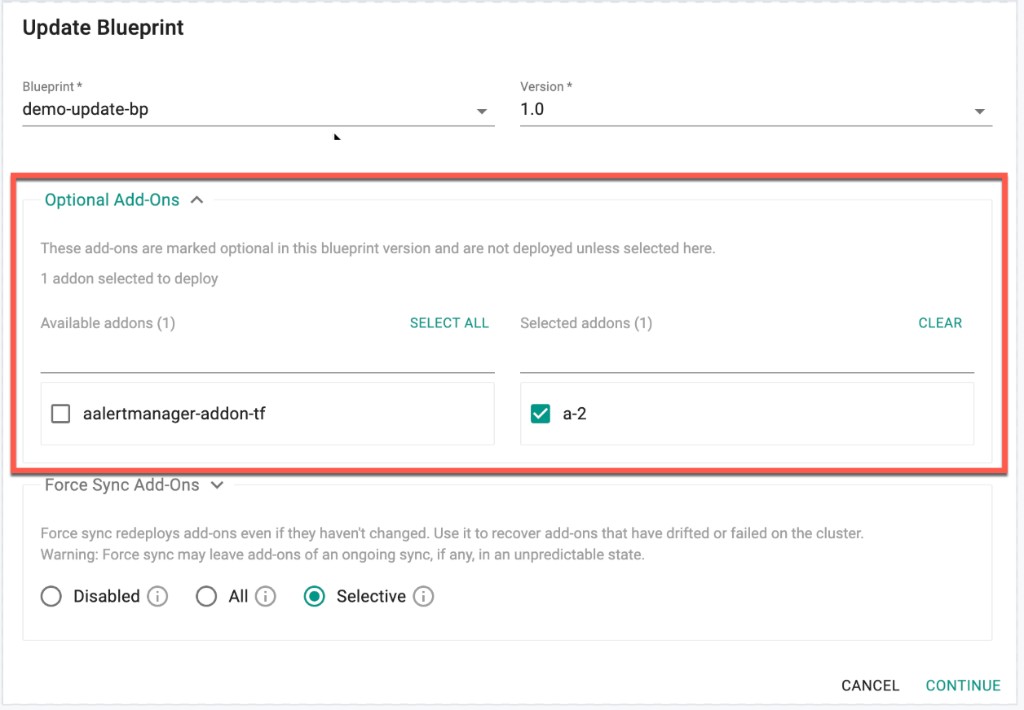
Changing the selection on an existing cluster and syncing the blueprint deploys newly selected add-ons and removes any that are no longer selected. Unselected optional add-ons appear as Not Selected. An add-on that was previously deployed and is then excluded is undeployed and marked Undeployed, but remains in the add-on list.
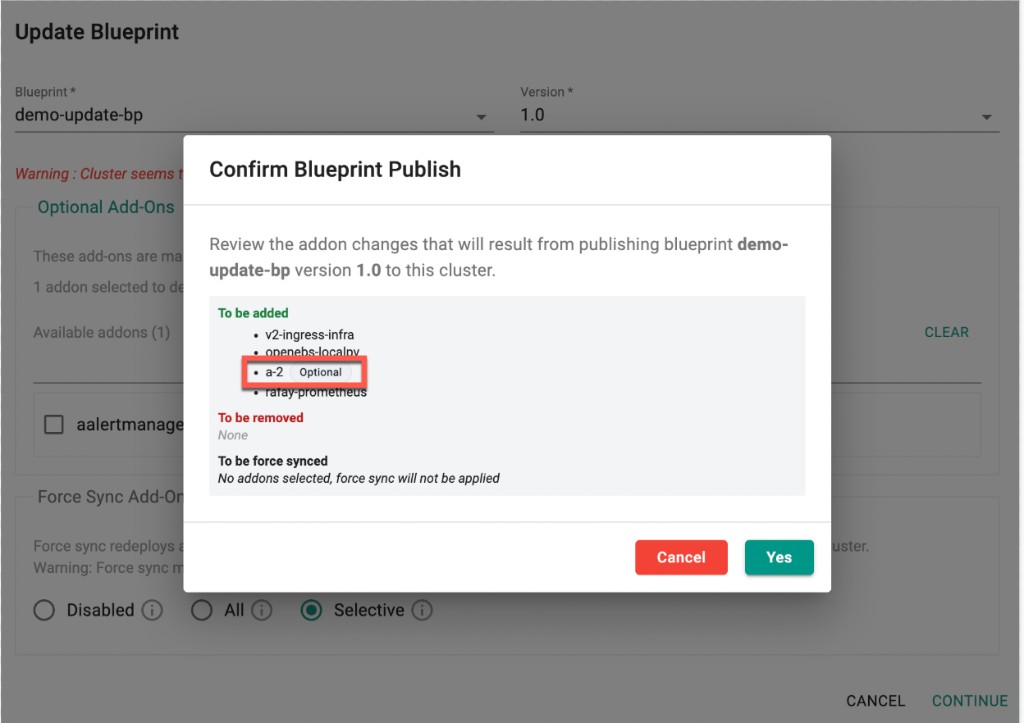
Continue opens Confirm Blueprint Publish, which lists add-ons To be added, To be removed, and To be force synced. Optional add-ons in this list are tagged Optional.
Force Sync Add-Ons on the same dialog redeploys add-ons even if they have not changed, to recover add-ons that have drifted or failed. Choose Disabled, All, or Selective. Selective force sync includes only mandatory add-ons and optional add-ons selected for deployment.
Warning
An older rctl or Terraform client that omits the optionalAddons field when updating a cluster's blueprint undeploys any optional add-ons already on the cluster.
IDP Integration
Allow Subdomains
You can specify additional subdomains as part of IdP configuration so that those hostnames also route to the same IdP for SSO. Each subdomain is the complete domain name, not just the prefix.
Benefit
Route multiple hostnames in the same organization to one IdP for SSO, without creating a separate Identity Provider for each subdomain.
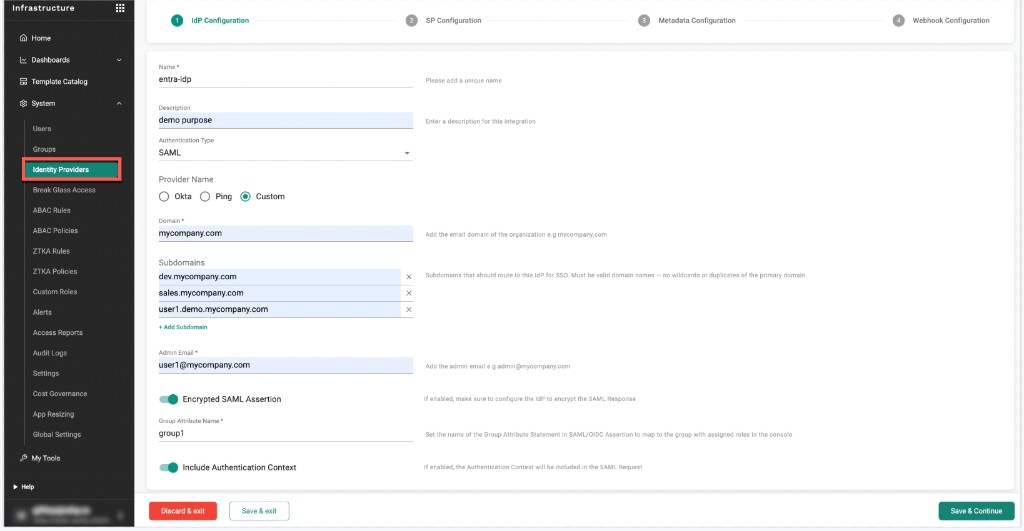
Subdomains can also be set in YAML using the file-based (-f) method for create and update. The inline command does not accept a subdomains argument.
domain: samlidp.com
subdomains:
  - sub1.samlidp.com
  - sub2.samlidp.com
Note
Within an org, each domain or subdomain can belong to only one IdP. Subdomains must be full hostnames under the primary Domain (no wildcards). Domain and Admin Email cannot be changed after save; subdomains can be edited later.
Dashboard
Licensed Nodes
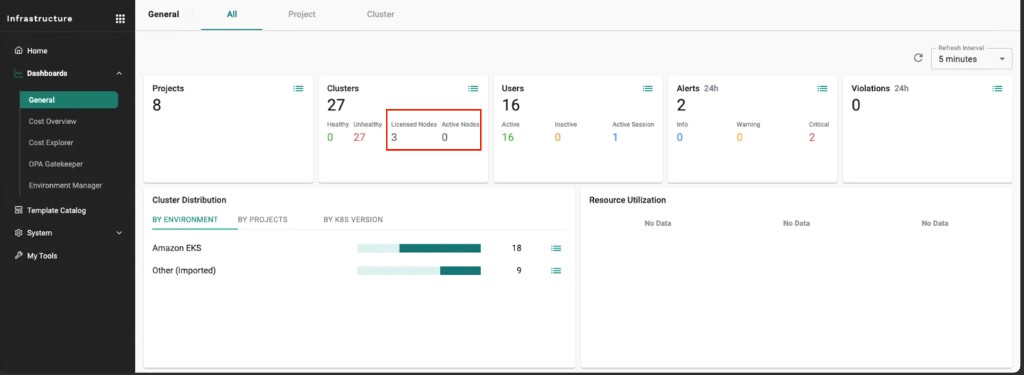
The General dashboard now shows Licensed Nodes and Active Nodes on the Clusters card. Licensed Nodes is the node count the end customer is licensed for, as defined in the sales agreement. Rafay operations sets and updates that count on the SaaS platform so the Org dashboard shows the actual licensed amount. Active Nodes is how many are currently in use.
Licensed Nodes appears only after that count is configured. If it is not set, it does not appear on the dashboard.
Benefit
Compare the licensed node count from your sales agreement with how many nodes you are using.
Bug Fixes
The following bug fixes are included in this release:
| Bug ID | Description |
|---|---|
| RC-54177 | EKS: Fixed an issue where zonal shift and auto zonal shift configuration could be applied out of sequence, leaving cluster state inconsistent |
| RC-40634 | EKS: Fixed an issue where the Terraform rafay_eks_pod_identity resource was not idempotent when create_service_account was set |
| RC-56205 | EKS: Fixed an issue where adding a node group with Terraform to a fully loaded cluster failed with "Deletion is not supported" for maxPodsPerNode, volumeIOPS, and volumeThroughput on an unrelated managed node group |
| RC-56022 | RCTL: Improved the help text for the rctl config init command |
v1.1.69 - Terraform Provider
The following enhancements are included in this release:
| Resource | Enhancement |
|---|---|
rafay_blueprint |
Added is_optional on add-ons. When true, the add-on is not deployed by default and can be selected during blueprint sync. |
rafay_aks_cluster, rafay_mks_cluster, rafay_gke_cluster, rafay_eks_cluster |
Added optional_addons. Optional add-ons are deployed only if listed here; order does not matter. |
rafay_eks_pod_identity |
Updated create_service_account. Unset or true creates the Kubernetes service account; false deletes a Rafay-created one. Removing the argument keeps the current value. |
rafay_gke_cluster |
Added Day-2 upgrades for capi_version and capg_version on an existing GKE cluster. |
v4.3 Update 4 - SaaS
23 Oct, 2026
Security Update
The SaaS platform was immediately patched with the Node.js release that includes the fixes for the CVEs reported in the 21 October 2026 Node.js security releases. The platform is up to date, and no action is required.
v4.3 Update 3 - SaaS
15 Oct, 2026
Google GKE
CAPI and CAPG Controller Upgrade
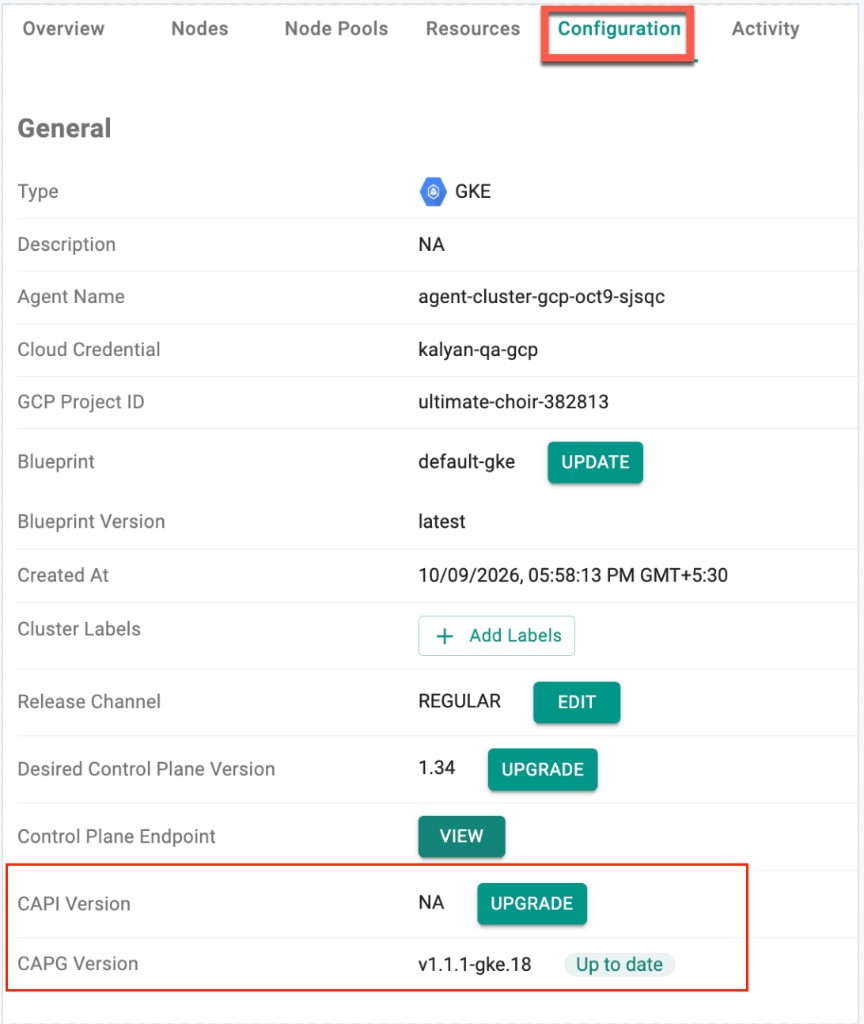
GKE clusters can now upgrade the CAPI (Cluster API) and CAPG (Cluster API Provider GCP) controller versions as a Day-2 operation. A CAPG upgrade is optional. Use it when a newly added GKE capability requires a newer CAPG version.
On the cluster Configuration tab, CAPI Version and CAPG Version appear below Control Plane Endpoint. Each shows the version running on the cluster. An Up to date label appears when no newer version is available; otherwise an UPGRADE button is shown.
The same change can be applied with RCTL or GitOps by updating only the version in the existing cluster spec:
spec:
  config:
    capgVersion: v1.1.1-gke.17   # was v1.1.1-gke.16
For details, see Update CAPI / CAPG Controller Version.
Bug Fixes and Security Updates
This patch release includes bug fixes and security updates that address known CVEs.
v4.3 Update 2 - SaaS
8 Oct, 2026
Upstream Kubernetes for Bare Metal and VMs
Kubernetes v1.37
New Rafay MKS clusters based on upstream Kubernetes can now be provisioned with Kubernetes v1.37. Existing clusters managed by the controller can be upgraded in-place to Kubernetes v1.37.
Note
For new clusters Kubernetes v1.37 requires etcd 3.7.0, which is supported from platform version 1.5.0. The UI defaults to the latest platform version (1.6.0), which includes etcd 3.7.0. This platform requirement does not apply when upgrading existing clusters in-place to Kubernetes v1.37.
Kubernetes patch versions
This release adds the following latest Kubernetes patch versions:
- v1.36.4 — Kubernetes 1.36
- v1.35.8 — Kubernetes 1.35
- v1.34.11 — Kubernetes 1.34
- v1.33.12 — Kubernetes 1.33
By default, the console shows these latest active patch versions. Rafay recommends them for new clusters and upgrades.
Older patch versions remain available when Show deprecated Kubernetes patch versions is enabled in the cluster provisioning UI.
Platform versions
This release adds the following platform versions. v1.6.0 is the latest and is selected by default when creating a cluster in the UI.
- v1.6.0 (default) — Adds a Node Settings component (starting at v1.0.0) that version-controls node configuration changes. Later node optimizations and configuration updates will ship through this component.
- v1.5.0 — Updates etcd to 3.7.0, which is required to create new Kubernetes v1.37 clusters.
- v1.4.0 — Includes an etcd version 3.6.14 update for clusters that need a newer etcd. This is only required if users would wish to update their existing etcd version to this version.
- v1.3.2 — Includes Cluster Utils bug fixes for improved stability.
Bug Fixes
The following bug fixes are included in this release:
| Bug ID | Description |
|---|---|
| RC-54520 | AKS: Fixed an intermittent issue where rctl apply for v3 clusters failed with a 404 / "cluster Apply failed" error |
| RC-55016 | GKE: Fixed an issue where a node pool update could remain stuck in the Pending or Retry state |
| RC-50441 | RCTL: Fixed an issue where rctl apply unpublished a namespace when the YAML used the v2 schema or was missing v3 placement |
| RC-55450 | SAML: Fixed an issue with IdP domain verification email |
| RC-45093 | MKS: Fixed an issue where addon dependencies were not honored when provisioning a new cluster with CNI via blueprint |
v4.3 Update 1 - SaaS
1 Oct, 2026
Google GKE
GKE Metadata Server
GKE node pools can now enable the GKE Metadata Server (workloadMetadataMode) in Day 0 and as a Day-2 operation. This option is configured at the node pool level and requires Workload Identity to be enabled on the cluster. Configure it in the node pool Node Security section, or via API, RCTL and Terraform.
Benefit
Workloads on the node pool can securely access Google Cloud services using Workload Identity, without the need to manage service account key files.
Bug Fixes
The following bug fixes are included in this release:
| Bug ID | Description |
|---|---|
| RC-54071 | GKE: Fixed an issue where a node pool could be deleted from a cluster that had only one node pool |
| RC-54523 | EKS: Fixed an issue where IAM service account creation failed |
v1.1.68 - Terraform Provider
The following enhancements are included in this release:
| Resource | Enhancement |
|---|---|
rafay_gke_cluster |
Added workload_metadata_mode for node pools. Valid values: gce_metadata, gke_metadata. gke_metadata requires cluster Workload Identity. Leave unset to use the GKE default. |